How to Use Partnership Ads on Meta in 2026

How to Use Partnership Ads on Meta in 2026

Meta Ads

November 18, 2025 | Updated October 29, 2026

November 18, 2025 | Updated October 29, 2026

blogs

Published November 18, 2025 | Updated October 29, 2026

Meta's new Partnership Ads Hub is the latest way for brands to easily work with content creators and influencers in a whitelisting capacity on Meta in 2026. Brands can request new partnerships, manage access to existing partnership content, and discover new partners to work with. We're loving the new Partnership Ads experience because it makes influencer whitelisting, a once-tedious process, significantly easier. Updated October 2026 to include creator permission steps, Facebook vs. Instagram setup, and current cost benchmarks.

Essential Takeaways:

  • The new Partnership Ads Hub has 3 main tabs: the Partners tab, where you can send new Partnership requests and accept pending requests from new Partners with the click of a button, the Content tab, where you can see all of the partnership content your brand is currently tagged in, and the Creator Marketplace, where you can browse recommended creators and invite lists of creators to join your Partnership campaigns.

  • The streamlined Partner Request experience has replaced the old, more tedious whitelisting process. For single Boosted Post access, creators can simply share a Partnership Ad Code with brands once their post is live. For full whitelisting access, brands can send partnership requests with the click of a button.

  • Partnership Ads at scale are becoming increasingly important in the Meta ad delivery algorithm, and brands who test this creative format will be rewarded with improved ad performance.

How Partnership Ads Differ From Regular Ads

Partnership Ads are ads that run from a creator's handle using their content, with your targeting and budget. Regular ads run from your brand's own account. That one difference changes who the audience sees, how the ad looks, and how you get access.


Partnership Ads

Regular Brand Ads

Runs from

Creator's handle

Your brand's handle

Content source

Creator-made, creator's voice

Brand-made or agency-made

Access required

Creator permission or Ad Code

None

Targeting and budget

Yours

Yours

Typical cost structure

Content fee plus monthly ad promotion fee

Production cost plus ad spend

Best for

Social proof, native feel, new audiences

Direct offers, retargeting, brand control

Creative control

Limited. Over-directing hurts performance

Full

Use Partnership Ads for prospecting and creative testing. Use regular ads for retargeting and offer-led creative. Run both. They do different jobs.

What Are Meta Partnership Ads?

Partnership Ads are Meta's evolved approach to influencer whitelisting that allows brands to run ads using creator content while maintaining the creator's authentic voice. Unlike traditional brand ads that run from your business account, Partnership Ads appear in feeds as if they're coming directly from the creator—but with your brand's targeting and budget behind them.

The key difference from standard whitelisting is the streamlined workflow. Where brands once needed manual back-and-forth with creators for ad permissions, Partnership Ads now operate through Meta's centralized hub with one-click approvals and automated content access.

How to Set Up a Partnership Ads Campaign on Meta

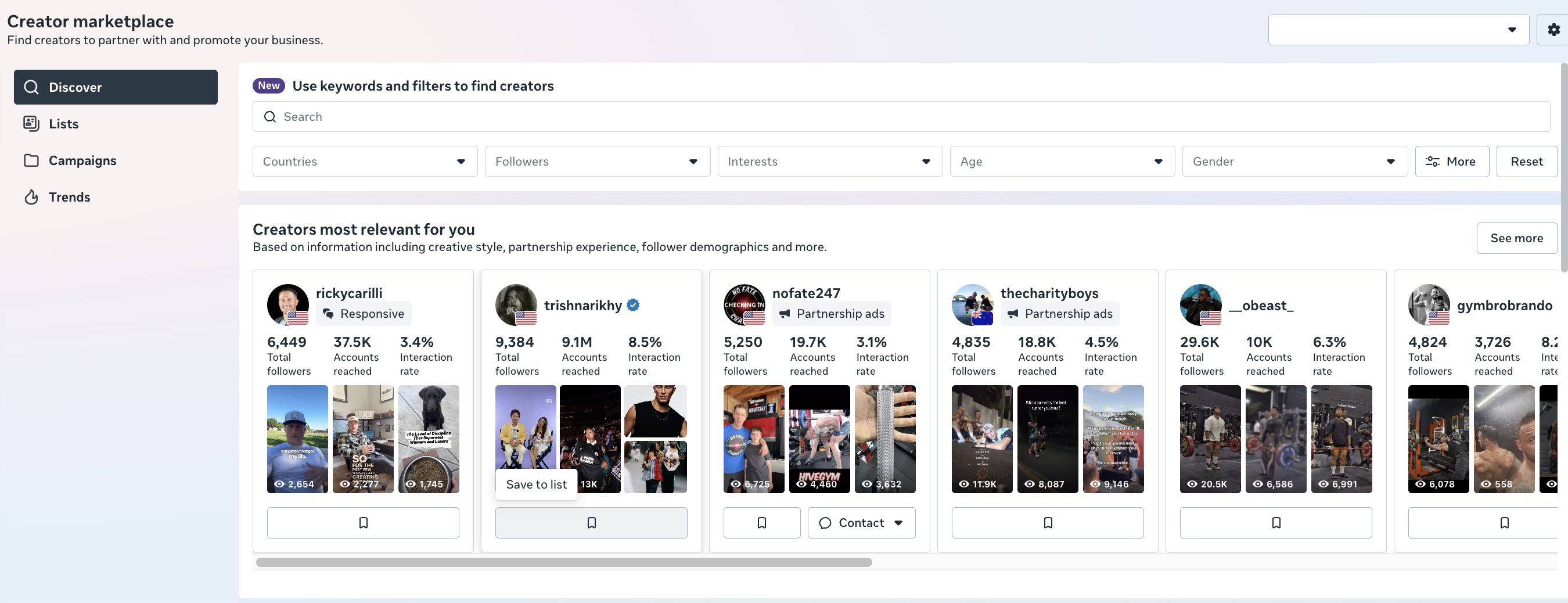
First, navigate to Meta's Partnership Ads Hub, found within the nav menu of Meta Ads Manager. Next, click the Creator Marketplace tab. You will see a list of Creators Most Relevant For You, curated by Meta using first-party data about your business. You'll want to save most of these to a new list, as their audiences will be highly relevant to your target customers.

blogs


Next, go to the Campaigns tab and start a new campaign. Your goal for this campaign should be "Source Creative Content" from the dropdown menu. You can either turn Fixed Offer Compensation on or off depending on if you have a fixed budget, or if you're willing to negotiate with creators.

set up procedure

Lastly, fill in your remaining campaign details. Make sure your compensation is competitive for creators in this range to make 1 Reel for your brand, and make sure to toggle ON "request ad promotion" so that you can run the Reel that they post as a Partnership ad. Your ad promotion request fee should also be competitive. Most creators charge a minimum of $100-$200/month for ad promotion.

Once you publish the campaign, you can invite all of the creators from the target list that you built to join the campaign. Try to get content from as many of these creators as your budget permits, and be sure to run ALL of the videos as Partnership ads.

Note: if you're looking to set up and launch Partnership ads in bulk, the perfect tool for that is Blip - a bulk ad launcher for Meta and TikTok.

Creator Permissions and Access for Partnership Ads

Partnership Ads only run if the creator grants you access. You do not control the permission. The creator does.

There are two access paths, and they work differently:

  • Partnership Ad Code (single post). The creator publishes the post, generates a Partnership Ad Code, and sends it to you. You enter the code in Ads Manager to run that one post as an ad. Use this to test a single piece of content.

  • Partner request (full access). You send a partnership request from the Partners tab. Once the creator accepts, you can run ads from any eligible content on their account for the duration of the permission. Use this when you want to test multiple creatives from the same creator.

What the creator needs to approve:

  1. Your brand's ad account or Page as an authorized partner.

  2. The specific content (single post) or their whole content library (full access).

  3. A time window. Ask for 30 days to start. Extend only if the ad is a winner.

What to do when access stalls:

  • Request pending. Creators often miss the notification. Message them directly and tell them to check the Partners tab or their Meta Business Suite notifications.

  • Permission expired or revoked. The ad stops delivering. Do not rebuild the ad. Request access again and relink the same post so you keep your engagement history.

  • Creator account type. Creators typically need a professional account (Creator or Business) to approve partnership requests.

Get access terms in writing before you pay. Specify the access window, ad promotion fee, and whether you can edit the caption or CTA.

Facebook vs. Instagram: Partnership Ads Setup

Partnership Ads run across both Facebook and Instagram placements, but the setup steps differ at the account and permission level. Plan for both before you brief the creator.

Setting Up Partnership Ads on Instagram

  1. Confirm the creator has a professional Instagram account (Creator or Business).

  2. Have the creator publish the Reel or post to their feed.

  3. The creator enables partnership ad permissions on the post and either sends you a Partnership Ad Code or approves your partner request.

  4. In Ads Manager, open the Partnership Ads Hub, go to the Content tab, and select the approved post.

  5. Build the ad. Set your audience, placements, budget, and CTA. The ad runs from the creator's handle.

Setting Up Partnership Ads on Facebook

  1. Confirm the creator has a Facebook Page, not just a personal profile.

  2. Have the creator publish the content to their Page.

  3. The creator approves your request through Meta Business Suite or by sharing the code.

  4. In Ads Manager, find the approved content under the Content tab and select it.

  5. Build the ad using the same audience and budget settings you use for any conversion campaign.

Partnership Ad Costs and Budgeting

Partnership Ad costs break down into two components: content creation fees and ad promotion fees. Content creation typically ranges from $100-$500 per Reel for creators with <50k followers, depending on their exact following and engagement rates. Ad promotion fees - the monthly cost for using creator content in your ads - typically start at $50/month minimum. It's recommended to ask for 1 month of "whitelisting" access to start. If it's a winning ad, you can extend it.

Budget at least 3-5x your normal creative production costs when testing Partnership Ads, as you're paying for both content and promotion on their organic page. The performance upside usually justifies the investment, but plan accordingly.

Published November 18, 2025 | Updated October 29, 2026

Meta's new Partnership Ads Hub is the latest way for brands to easily work with content creators and influencers in a whitelisting capacity on Meta in 2026. Brands can request new partnerships, manage access to existing partnership content, and discover new partners to work with. We're loving the new Partnership Ads experience because it makes influencer whitelisting, a once-tedious process, significantly easier. Updated October 2026 to include creator permission steps, Facebook vs. Instagram setup, and current cost benchmarks.

Essential Takeaways:

  • The new Partnership Ads Hub has 3 main tabs: the Partners tab, where you can send new Partnership requests and accept pending requests from new Partners with the click of a button, the Content tab, where you can see all of the partnership content your brand is currently tagged in, and the Creator Marketplace, where you can browse recommended creators and invite lists of creators to join your Partnership campaigns.

  • The streamlined Partner Request experience has replaced the old, more tedious whitelisting process. For single Boosted Post access, creators can simply share a Partnership Ad Code with brands once their post is live. For full whitelisting access, brands can send partnership requests with the click of a button.

  • Partnership Ads at scale are becoming increasingly important in the Meta ad delivery algorithm, and brands who test this creative format will be rewarded with improved ad performance.

How Partnership Ads Differ From Regular Ads

Partnership Ads are ads that run from a creator's handle using their content, with your targeting and budget. Regular ads run from your brand's own account. That one difference changes who the audience sees, how the ad looks, and how you get access.


Partnership Ads

Regular Brand Ads

Runs from

Creator's handle

Your brand's handle

Content source

Creator-made, creator's voice

Brand-made or agency-made

Access required

Creator permission or Ad Code

None

Targeting and budget

Yours

Yours

Typical cost structure

Content fee plus monthly ad promotion fee

Production cost plus ad spend

Best for

Social proof, native feel, new audiences

Direct offers, retargeting, brand control

Creative control

Limited. Over-directing hurts performance

Full

Use Partnership Ads for prospecting and creative testing. Use regular ads for retargeting and offer-led creative. Run both. They do different jobs.

What Are Meta Partnership Ads?

Partnership Ads are Meta's evolved approach to influencer whitelisting that allows brands to run ads using creator content while maintaining the creator's authentic voice. Unlike traditional brand ads that run from your business account, Partnership Ads appear in feeds as if they're coming directly from the creator—but with your brand's targeting and budget behind them.

The key difference from standard whitelisting is the streamlined workflow. Where brands once needed manual back-and-forth with creators for ad permissions, Partnership Ads now operate through Meta's centralized hub with one-click approvals and automated content access.

How to Set Up a Partnership Ads Campaign on Meta

First, navigate to Meta's Partnership Ads Hub, found within the nav menu of Meta Ads Manager. Next, click the Creator Marketplace tab. You will see a list of Creators Most Relevant For You, curated by Meta using first-party data about your business. You'll want to save most of these to a new list, as their audiences will be highly relevant to your target customers.

blogs


Next, go to the Campaigns tab and start a new campaign. Your goal for this campaign should be "Source Creative Content" from the dropdown menu. You can either turn Fixed Offer Compensation on or off depending on if you have a fixed budget, or if you're willing to negotiate with creators.

set up procedure

Lastly, fill in your remaining campaign details. Make sure your compensation is competitive for creators in this range to make 1 Reel for your brand, and make sure to toggle ON "request ad promotion" so that you can run the Reel that they post as a Partnership ad. Your ad promotion request fee should also be competitive. Most creators charge a minimum of $100-$200/month for ad promotion.

Once you publish the campaign, you can invite all of the creators from the target list that you built to join the campaign. Try to get content from as many of these creators as your budget permits, and be sure to run ALL of the videos as Partnership ads.

Note: if you're looking to set up and launch Partnership ads in bulk, the perfect tool for that is Blip - a bulk ad launcher for Meta and TikTok.

Creator Permissions and Access for Partnership Ads

Partnership Ads only run if the creator grants you access. You do not control the permission. The creator does.

There are two access paths, and they work differently:

  • Partnership Ad Code (single post). The creator publishes the post, generates a Partnership Ad Code, and sends it to you. You enter the code in Ads Manager to run that one post as an ad. Use this to test a single piece of content.

  • Partner request (full access). You send a partnership request from the Partners tab. Once the creator accepts, you can run ads from any eligible content on their account for the duration of the permission. Use this when you want to test multiple creatives from the same creator.

What the creator needs to approve:

  1. Your brand's ad account or Page as an authorized partner.

  2. The specific content (single post) or their whole content library (full access).

  3. A time window. Ask for 30 days to start. Extend only if the ad is a winner.

What to do when access stalls:

  • Request pending. Creators often miss the notification. Message them directly and tell them to check the Partners tab or their Meta Business Suite notifications.

  • Permission expired or revoked. The ad stops delivering. Do not rebuild the ad. Request access again and relink the same post so you keep your engagement history.

  • Creator account type. Creators typically need a professional account (Creator or Business) to approve partnership requests.

Get access terms in writing before you pay. Specify the access window, ad promotion fee, and whether you can edit the caption or CTA.

Facebook vs. Instagram: Partnership Ads Setup

Partnership Ads run across both Facebook and Instagram placements, but the setup steps differ at the account and permission level. Plan for both before you brief the creator.

Setting Up Partnership Ads on Instagram

  1. Confirm the creator has a professional Instagram account (Creator or Business).

  2. Have the creator publish the Reel or post to their feed.

  3. The creator enables partnership ad permissions on the post and either sends you a Partnership Ad Code or approves your partner request.

  4. In Ads Manager, open the Partnership Ads Hub, go to the Content tab, and select the approved post.

  5. Build the ad. Set your audience, placements, budget, and CTA. The ad runs from the creator's handle.

Setting Up Partnership Ads on Facebook

  1. Confirm the creator has a Facebook Page, not just a personal profile.

  2. Have the creator publish the content to their Page.

  3. The creator approves your request through Meta Business Suite or by sharing the code.

  4. In Ads Manager, find the approved content under the Content tab and select it.

  5. Build the ad using the same audience and budget settings you use for any conversion campaign.

Partnership Ad Costs and Budgeting

Partnership Ad costs break down into two components: content creation fees and ad promotion fees. Content creation typically ranges from $100-$500 per Reel for creators with <50k followers, depending on their exact following and engagement rates. Ad promotion fees - the monthly cost for using creator content in your ads - typically start at $50/month minimum. It's recommended to ask for 1 month of "whitelisting" access to start. If it's a winning ad, you can extend it.

Budget at least 3-5x your normal creative production costs when testing Partnership Ads, as you're paying for both content and promotion on their organic page. The performance upside usually justifies the investment, but plan accordingly.

Want this run for your brand?

Flighted is a performance marketing agency for ecommerce and B2B SaaS brands that specializes in Meta ads. We work with brands spending $25k+ a month.

The Benefits of Partnership Ads

Partnership Ads, because they harness the audiences of the influencers who you are working with, are a fantastic way for advertisers to reach new audiences they would otherwise struggle to find with their typical creative strategy.

Additionally, Partnership Ads appear more native in the social feed as they are run from the creator's handle, not the brand handle, which can increase CTR and reduce CPC on those creatives.

Common Partnership Ad Mistakes to Avoid

The biggest mistake when running Partnership Ads is not running Partnership Ads consistently. Many brands create one-off partnerships instead of building ongoing creator relationships that compound over time. Consistent Partnership Ad presence improves algorithm familiarity and performance.

Another common error is over-directing creative briefs. Partnership Ads perform best when creators maintain their authentic voice and style. Overly branded content defeats the native advantage that makes Partnership Ads effective.

Finally, avoid insufficient budget allocation for ad promotion. Spending $500 on content creation but only $200/month on ad spend limits your ability to scale successful Partnership Ad creative.

If you want Partnership Ads that actually scale, the creator content is only one part of it. You need paid media expertise to structure the campaigns, creative strategy to brief and test the right angles, and landing pages that convert the traffic those ads drive. Flighted runs all three together for Meta advertising clients. Talk to our Meta Ads team.

Partnership Ads Launch Checklist

  • Build a creator list of 10-20 from the Creator Marketplace tab.

  • Set the campaign goal to "Source Creative Content."

  • Offer compensation for 1 Reel per creator, plus an ad promotion fee.

  • Confirm a 30-day access window in writing.

  • Get the Partnership Ad Code or accepted partner request before building the ad.

  • Run every approved video as a Partnership ad. Do not cherry-pick before testing.

  • Review CTR, CPC, and CPA after 7 days against your best-performing brand creative.

  • Extend access only on ads that beat your benchmark.

Partnership Ads on Meta: Frequently Asked Questions

What are partnership ads on Meta?

Partnership Ads are Meta ads that run from a creator's or partner's handle using their content, with the brand's targeting and budget. They replaced the older "branded content ads" and manual whitelisting workflow. They show up in feeds as if the creator posted them, with a "Paid partnership" label.

How do I get access to a creator's content for partnership ads?

The creator grants it. They either send you a Partnership Ad Code for a single post, or accept your partner request in the Partnership Ads Hub for broader access. Ask for 30 days of access to start.

How much do partnership ads cost?

Expect two costs. Content creation typically runs $100-$500 per Reel for creators under 50k followers. Ad promotion fees start around $50/month and often run $100-$200/month. Budget 3-5x your normal creative production cost when testing, since you're paying for content and promotion.

Do partnership ads perform better than regular ads?

They often do on CTR and CPC because they look native in the feed, but results vary by creator fit and creative quality. Test them against your current best brand creative with the same audience and budget. Do not assume a win.

Can any creator run partnership ads with my brand?

No. The creator needs an eligible account (typically professional) and must approve your request. [VERIFY: eligibility requirements before publishing, then delete this tag]

How do I run a partnership ad on Instagram vs. Facebook?

The core flow is the same: get creator approval, select the content in the Partnership Ads Hub, and build the ad. Instagram needs a professional account. Facebook content must come from a Page. See the setup sections above for step-by-step instructions.

What's the difference between partnership ads and whitelisting?

Whitelisting is the older term for running ads through a creator's handle. Partnership Ads are Meta's built-in version, with a centralized hub, one-click requests, and Ad Codes in place of manual permission sharing.

How long can I run a partnership ad?

As long as the creator's permission is active. Most brands negotiate 30-day windows and extend winners. When the permission expires, the ad stops delivering.


Want this run for your brand?

Flighted is a performance marketing agency for ecommerce and B2B SaaS brands that specializes in Meta ads. We work with brands spending $25k+ a month.

Flighted

Flighted is the operating brand of Peter Czepiga LLC, a New York City-based performance marketing agency.

New York, NY 11217

hello@flighted.co

© Flighted, 2026

Flighted

Flighted is the operating brand of Peter Czepiga LLC, a New York City-based performance marketing agency.

New York, NY 11217

hello@flighted.co

© Flighted, 2026